Afterform Studio

Let your images take up space.

An image-led portfolio for digital artists and small creative studios. Four independent Framer components pair a layered cover with expanding projects and a visitor-controlled visual sequence.

Framer code component kit

US$39 · one-time purchase

US dollars. Applicable taxes appear at checkout.
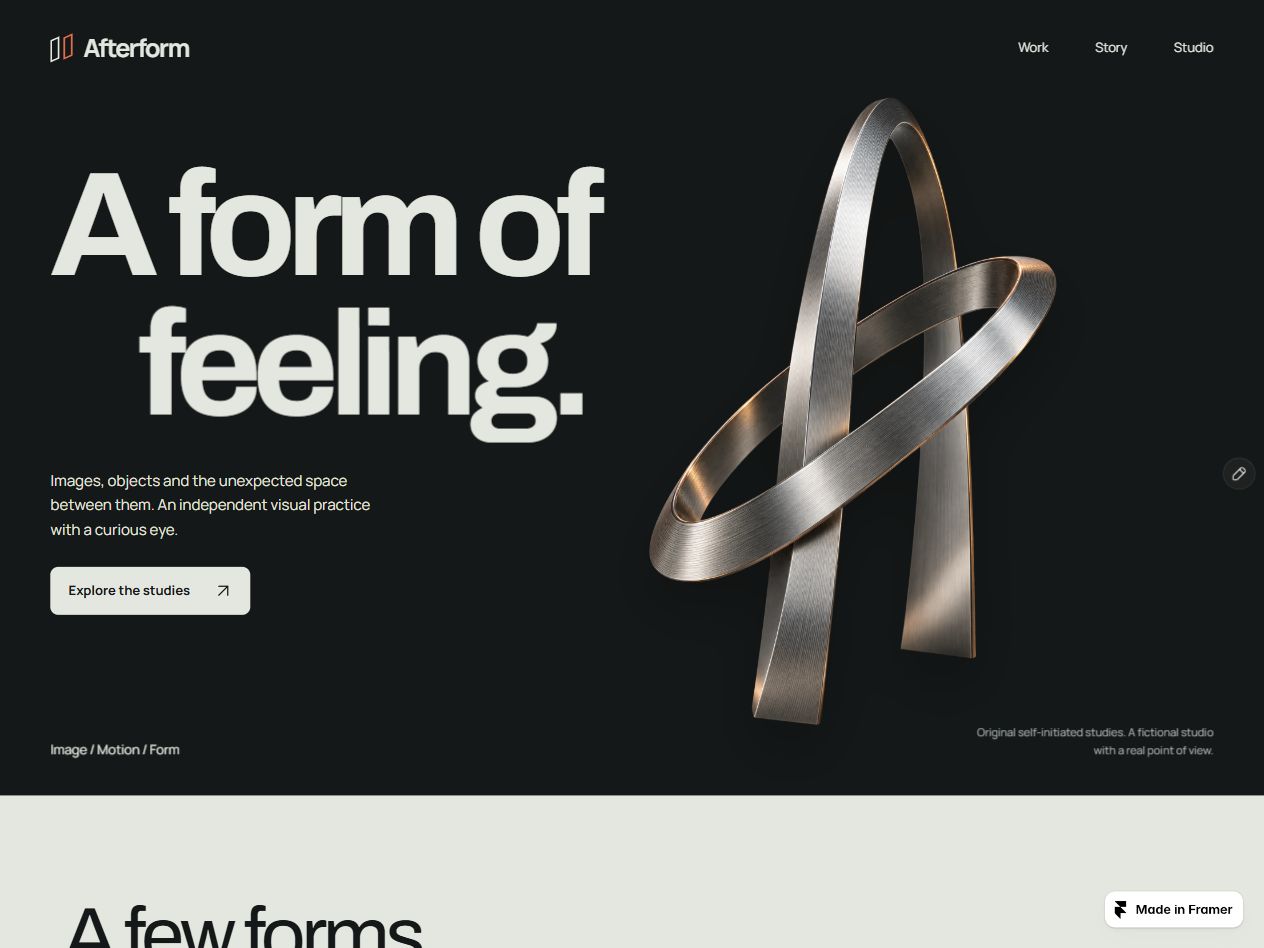
Afterform Studio portfolio with a layered silver form, large editorial typography, a charcoal opening and a light selected-work section.

Give a strong image room to make an entrance. Afterform opens with a silver form and large editorial type, then moves into a lighter project section where one selected study takes the wider frame.

Visitors choose the project they want to see and move through the visual chapters at their own pace. The cover adds a small pointer response. The chapter slider changes the image and its story together.

Start with the fictional Afterform studio and its four original AI-generated abstract studies, then bring in your own work. Edit the words, images, colours, fonts and links in Framer’s property panel. Each section works on its own. The portfolio folder has had enough time to itself.

A good fit for

Digital artists, image and motion designers, and small creative studios presenting a focused collection of visual work.

Four sections for your images.

Afterform Cover

Afterform Cover

A dark opening with layered typography and a cutout image. Edit the brand, navigation, introduction and CTA, with optional subtle pointer motion.

A dark opening with layered typography and a cutout image. Edit the brand, navigation, introduction and CTA, with optional subtle pointer motion.

Afterform Projects

Afterform Projects

An expanding image strip for up to six projects. Selecting a project reveals its description and optional destination link. Arrow, Home and End keys also change the selection.

An expanding image strip for up to six projects. Selecting a project reveals its description and optional destination link. Arrow, Home and End keys also change the selection.

Afterform Sequence

Afterform Sequence

A visual sequence of up to six chapters. A slider and previous/next buttons change the image, title and description together.

A visual sequence of up to six chapters. A slider and previous/next buttons change the image, title and description together.

Afterform Footer

Afterform Footer

A light studio introduction with your own contact destination and two optional social links.

A light studio introduction with your own contact destination and two optional social links.

Includes four self-contained component source files, individual Framer insert links, four original AI-generated PNG image studies and an English setup guide.

Put your work in the frame.

Download the kit after checkout and open START-HERE.html. Choose a component and paste its insert link into your Framer canvas. Arrange the four pieces, then change the text, images, colours, fonts and links in their property controls. The guide also includes a source-file installation option.

A Framer account and basic familiarity with the canvas and property panel. Framer hosting plans and any connected third-party services are purchased separately if your site needs them.

A few useful answers.

Can I use the four sections separately?

Can I use the four sections separately?

Yes. Each component has its own insert link and self-contained source file. Use the complete Afterform arrangement or add the sections your website needs.

Yes. Each component has its own insert link and self-contained source file. Use the complete Afterform arrangement or add the sections your website needs.

Can I edit it without writing code?

Can I edit it without writing code?

Change the main text, images, colours, fonts and links through each component’s Framer property controls. The visuals inside a code component are edited through those controls. They do not become separate native canvas layers.

Change the main text, images, colours, fonts and links through each component’s Framer property controls. The visuals inside a code component are edited through those controls. They do not become separate native canvas layers.

What are the images and interactions?

What are the images and interactions?

The download includes three static PNG abstract studies created with AI for the fictional studio. The cover responds subtly to a pointer, project buttons expand the selected image strip, and a chapter slider changes the visual sequence. Supply your own images to present your work. The kit contains image files rather than 3D models or video footage.

The download includes three static PNG abstract studies created with AI for the fictional studio. The cover responds subtly to a pointer, project buttons expand the selected image strip, and a chapter slider changes the visual sequence. Supply your own images to present your work. The kit contains image files rather than 3D models or video footage.

What happens after purchase?

What happens after purchase?

Lemon Squeezy provides the download. Open START-HERE.html for four insert links, a source-file alternative and editing notes. One purchase covers one completed website. We handle orders, access and defects; the guide covers routine setup.

Lemon Squeezy provides the download. Open START-HERE.html for four insert links, a source-file alternative and editing notes. One purchase covers one completed website. We handle orders, access and defects; the guide covers routine setup.

One completed website

One completed website

One purchase covers one completed personal, commercial or client website. You can edit the components and use the included PNG studies within that website. Keep the reusable kit and image files out of products you resell or redistribute.

One purchase covers one completed personal, commercial or client website. You can edit the components and use the included PNG studies within that website. Keep the reusable kit and image files out of products you resell or redistribute.

Guide and support

Guide and support

For order, download-access or reproducible defect issues, use the seller contact details on your receipt. The included guide covers installation and everyday editing.

For order, download-access or reproducible defect issues, use the seller contact details on your receipt. The included guide covers installation and everyday editing.

Seven-day conditional refunds

Seven-day conditional refunds

Contact the seller within 7 days for duplicate purchases or charges, unresolved delivery failure, or a material defect or advertised-feature mismatch that cannot reasonably be fixed. Timely requests stay open during investigation. Mandatory rights and Lemon Squeezy rules apply; see the included licence for the full policy.

Contact the seller within 7 days for duplicate purchases or charges, unresolved delivery failure, or a material defect or advertised-feature mismatch that cannot reasonably be fixed. Timely requests stay open during investigation. Mandatory rights and Lemon Squeezy rules apply; see the included licence for the full policy.

Wuren Studio. Digital goods with a point of view.

Paid orders and delivery are handled by Lemon Squeezy.

For order or product issues, use the seller contact shown on your receipt.

Create a free website with Framer, the website builder loved by startups, designers and agencies.